Debt Payoff Plan · Debt payoff planner for Google Sheets™

See when you'll be debt-free!

Every balance, its rate and its minimum in one place, and the date each one clears in the order you choose to pay them.

$19 one time

Tax added at checkout.

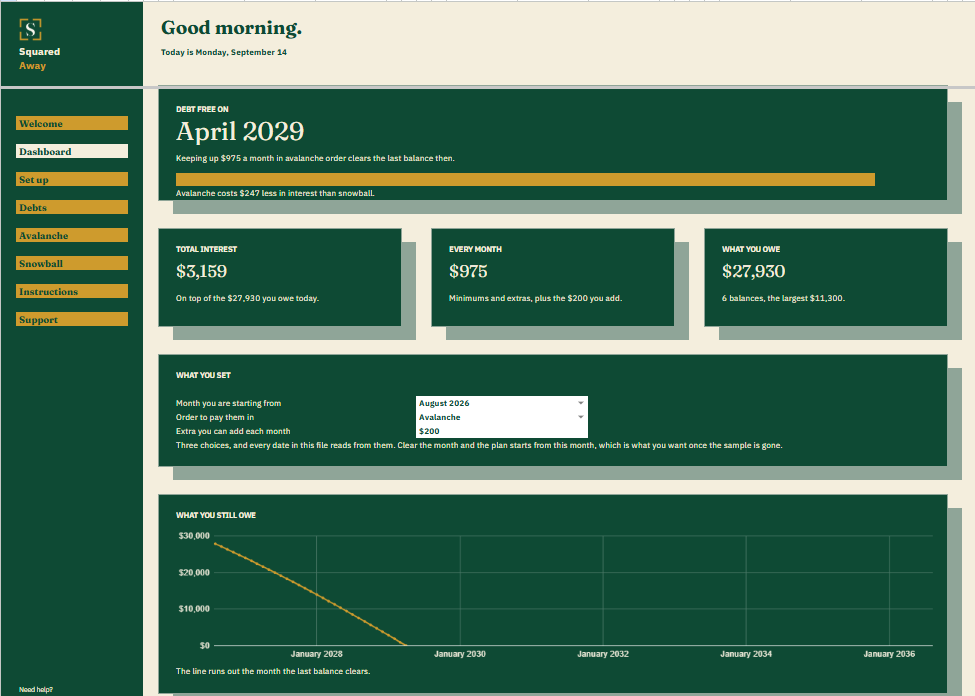
Debt Payoff Plan dashboard in Google Sheets showing debt free in April 2029, total interest of $3,159, $975 paid every month against $27,930 owed, the three choices that drive the plan, and a chart of what is still owed each month.
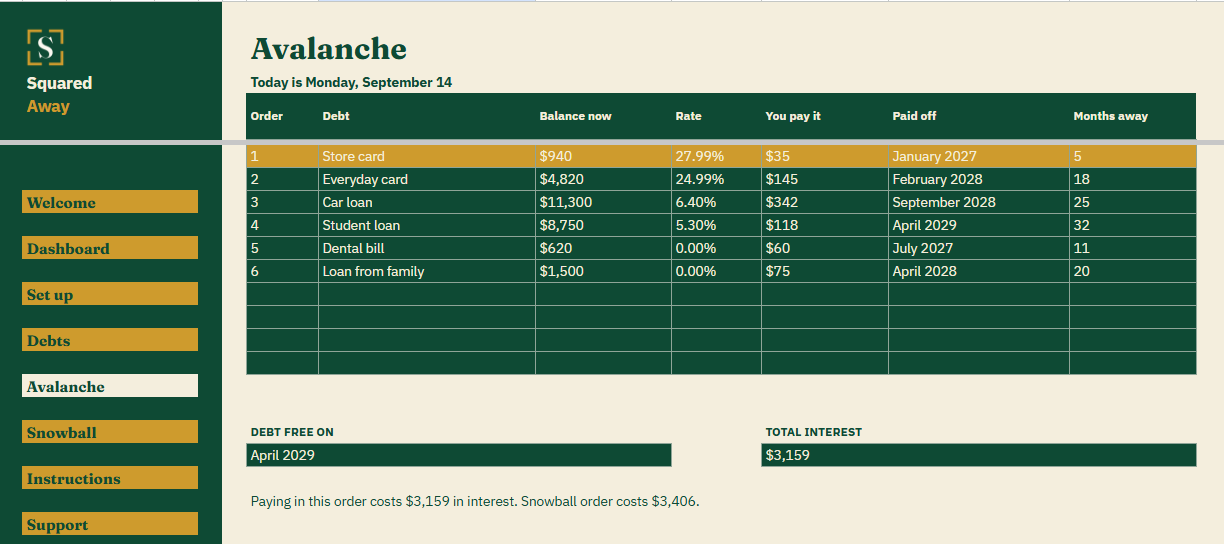
Debt Payoff Plan's Avalanche tab ordering the same debts highest rate first, with the store card next in line in gold, the month each clears, and the debt free date and total interest underneath.
The problem

Most people don't know when their debt will be paid off.

You pay the card, the car loan and the student loan every month, on time. Ask when the last one is gone and the honest answer is a guess. Minimums keep each account current. They say nothing about the finish line.

Extra money helps, and where it lands changes how much. Pay the highest rate first and you pay the least interest. Pay the smallest balance first and whole debts disappear sooner. Most people never see the two side by side.

What's inside

Your debts...with a plan.

Type each debt in once: the balance, the rate, the minimum, and anything extra you already pay on it. Then say how much more you can add each month. The file runs the plan month by month and shows the date each balance reaches zero, and the month you are debt free.

Avalanche and Snowball each get their own tab, so you can see what each order costs in interest before you pick one. One honest limit: the file keeps each minimum where you typed it, and a lender may lower yours as the balance falls. Update them now and then and the dates stay true.

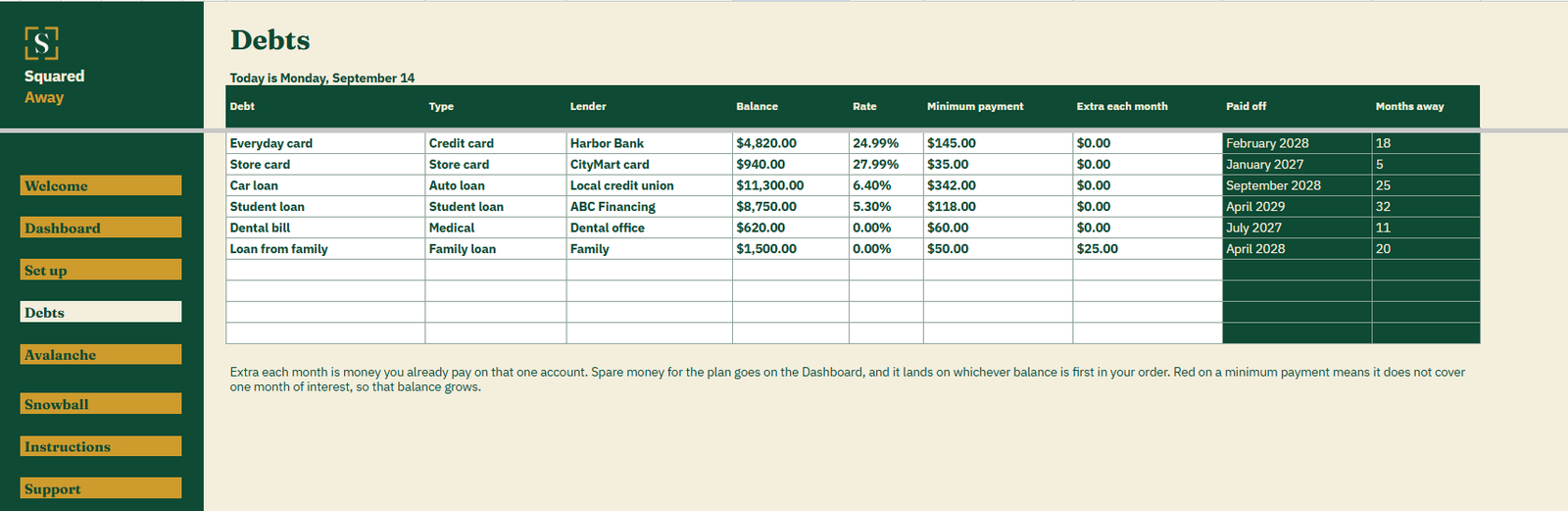
  • Debts. One row for each debt: its type, lender, balance, rate, minimum payment and any standing extra, with the month it is paid off worked out beside it.
  • Avalanche. Your debts highest rate first, with the date each one clears, the debt free date and the total interest. The debt next in line shows in gold.
  • Snowball. The same debts smallest balance first, with its own dates and its own interest total to compare.
  • The Dashboard. The month you are debt free, the total interest, what you pay every month and what you owe, with a chart of the balance falling to zero.
  • Red minimums. A minimum that does not cover a month of interest turns red, because that balance is growing.
  • Set up. Your own debt types and lenders. Both dropdowns on Debts read from them.
  • Sample debts. Six made-up debts already in place, so the plan makes sense before you type anything of your own.
Debt Payoff Plan's Debts tab listing six debts with type, lender, balance, rate, minimum payment and any standing extra, plus the month each one is paid off and how many months away that is.
What it looks like

Three tabs you'll actually use.

Debt Payoff Plan dashboard in Google Sheets showing debt free in April 2029, total interest of $3,159, $975 paid every month against $27,930 owed, the three choices that drive the plan, and a chart of what is still owed each month.
Debt Payoff Plan's Debts tab listing six debts with type, lender, balance, rate, minimum payment and any standing extra, plus the month each one is paid off and how many months away that is.
Debt Payoff Plan's Avalanche tab ordering the same debts highest rate first, with the store card next in line in gold, the month each clears, and the debt free date and total interest underneath.
After you buy

What happens after you buy.

1

We email you a link.

It goes to the address you paid with.

2

You make a copy.

It saves to your own Google Drive™ and stays private unless you share it.

3

You start using it.

It comes with sample entries already in it, so you can see how it works before you type in your own.

No surprises

The fine print, all of it.

  • You pay once, and the copy stays yours for good.
  • It opens in Google Sheets™ on a computer, or in the Sheets app on your phone.
  • You need a Google account. A free one works.
  • Changed your mind? Email us within 14 days for a refund. You don’t need a reason. The refund policy
Questions

Before you buy.

Does it connect to my bank or my lender?

No. Nothing here connects to anything. You type your balances in, and the file only holds what you put in it.

Should I put account numbers in it?

No. Name the lender, not the account. A spreadsheet is not the place for account numbers or logins.

Avalanche or snowball, which is better?

Avalanche costs less in interest. Snowball clears whole debts sooner, which some people find easier to stick with. The file shows both, so you see the difference in dollars before you choose.

What if I cannot add anything extra?

Leave the extra at zero. The plan still shows when each debt clears on minimums alone, and anything past twenty years says so.

How many debts can it hold?

Ten.

Is it financial advice?

No. It does the arithmetic on the numbers you give it. It cannot know that a rate will change or that a lender will lower a minimum.

Is there anything to renew?

No. You buy it once and the copy is yours to keep.

S

Know exactly when you'll be debt-free

No app. No account. No monthly anything.

$19 one time

Tax added at checkout.

If it isn’t right, email us within 14 days for a refund. The refund policy

You just get squared away.