Sinking Funds · Yearly bill planner for Google Sheets™

Pay the yearly bills from money already set aside.

Every bill that comes once or twice a year, what to set aside for each one every month, and which funds are falling behind.

$19 one time

Tax added at checkout.

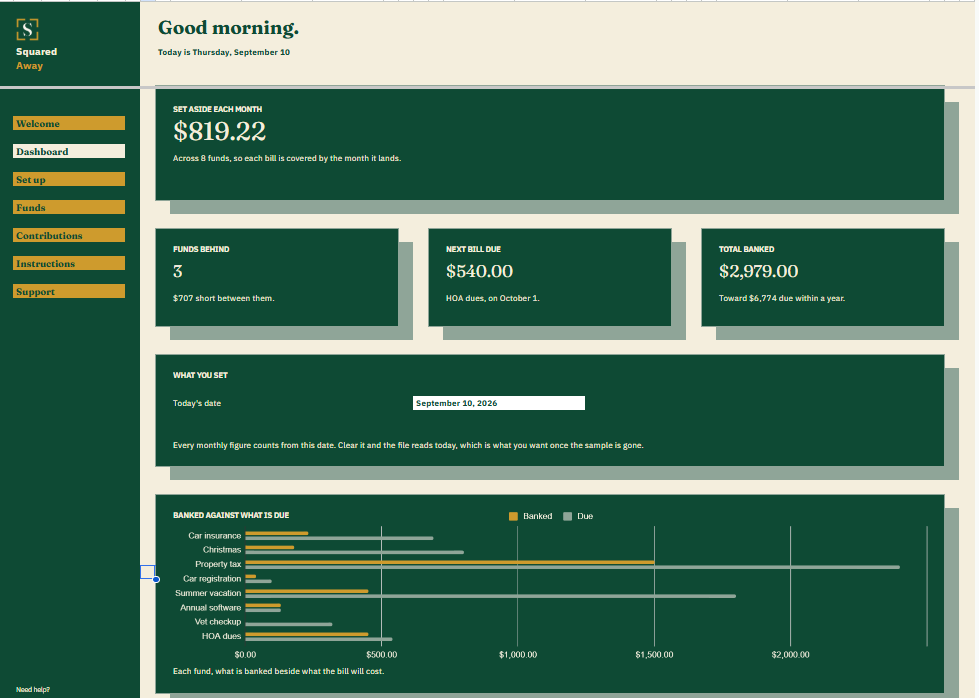
Sinking Funds dashboard in Google Sheets showing $819.22 to set aside each month, 3 funds behind, the next bill due, $2,979.00 banked, and a chart of each fund against what it will cost.
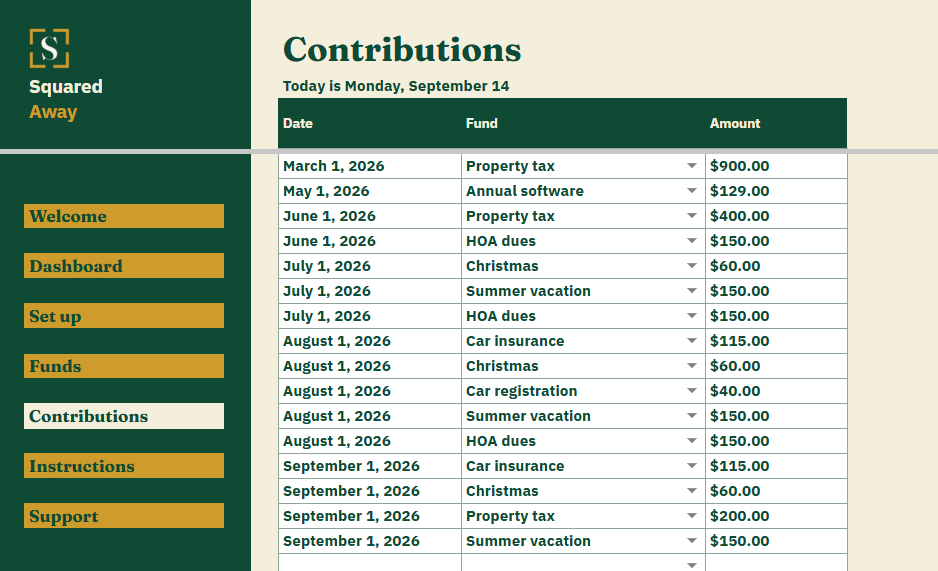
Sinking Funds' Contributions tab logging 16 dated amounts moved into each fund.
The problem

Yearly bills land on a month that was already spoken for.

The car insurance renews in March. Property tax is due in January. Christmas is in December, every year, without fail. None of it is a surprise, and all of it lands on a month whose money was already going somewhere.

Setting a little aside each month fixes it, but only if you know how much, for each bill, and whether you are keeping up. A savings account on its own will not tell you that.

What's inside

Every yearly bill, paid for a month at a time.

List each bill once: what it costs, when it is due, and whether it comes once or twice a year. Log what you move into each fund as you go. The file works out what to set aside for each one every month, what is banked, and how far any fund has fallen behind a steady pace.

It does not move money for you. You move it, into whichever account you keep it in, and write down what you did.

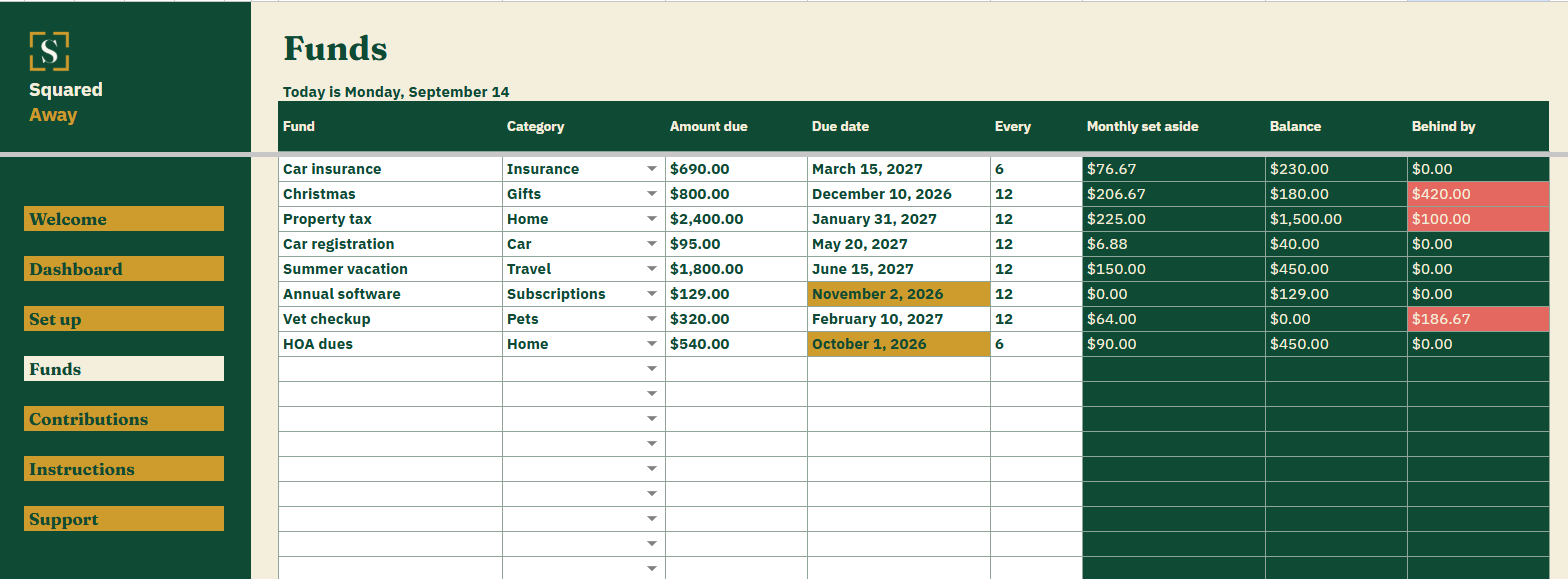
  • Funds. One row for each bill: its category, what it costs, the due date and how many months apart the bills come, with the monthly set-aside, balance and how far behind worked out beside it.
  • Contributions. A dated log of every amount you move into a fund. A paid bill goes in as a minus.
  • The Dashboard. What to set aside each month, how many funds are behind, the next bill due and what is banked, with a chart of each fund against what it will cost.
  • Red and gold. A fund behind its pace turns red. A bill due in the next 60 days turns gold.
  • Set up. Your own fund categories, behind the dropdown on Funds.
  • Sample funds. Eight made-up funds and sixteen contributions already in place, so the numbers make sense before you type your own.
Sinking Funds' Funds tab listing 8 yearly and twice-yearly bills with what each costs and when it is due, and the monthly set-aside, balance and how far behind each one is.
What it looks like

Three tabs you'll actually use.

Sinking Funds dashboard in Google Sheets showing $819.22 to set aside each month, 3 funds behind, the next bill due, $2,979.00 banked, and a chart of each fund against what it will cost.
Sinking Funds' Funds tab listing 8 yearly and twice-yearly bills with what each costs and when it is due, and the monthly set-aside, balance and how far behind each one is.
Sinking Funds' Contributions tab logging 16 dated amounts moved into each fund.
After you buy

What happens after you buy.

1

We email you a link.

It goes to the address you paid with.

2

You make a copy.

It saves to your own Google Drive™ and stays private unless you share it.

3

You start using it.

It comes with sample entries already in it, so you can see how it works before you type in your own.

No surprises

The fine print, all of it.

  • You pay once, and the copy stays yours for good.
  • It opens in Google Sheets™ on a computer, or in the Sheets app on your phone.
  • You need a Google account. A free one works.
  • Changed your mind? Email us within 14 days for a refund. You don’t need a reason. The refund policy
Questions

Before you buy.

Does it connect to my bank?

No. Nothing here connects to anything. You log what you move, and the file only holds what you put in it.

What counts as a sinking fund?

Any bill you know is coming but do not pay every month: insurance, property tax, a vacation, gifts, a yearly subscription.

What happens after I pay the bill?

Log what went out on Contributions as a minus, then change the due date to the next one. The balance and the monthly figure follow.

Why does a fund say it is behind?

It assumes you save evenly over the months between bills. Behind is how far the balance trails that pace, not a missed payment.

Can I use it on my phone?

Yes. Typing is easier on a laptop, but checking what is due works anywhere.

Is there anything to renew?

No. You buy it once and the copy is yours to keep.

S

Have the money ready before the bill arrives.

No app. No account. No monthly anything.

$19 one time

Tax added at checkout.

If it isn’t right, email us within 14 days for a refund. The refund policy

You just get squared away.