Grant Opportunity Pipeline · Funder and deadline log for Google Sheets™
See what is worth chasing, and what closes first.
Every funder you might approach, what it could be worth, when it closes, and whether you decided to go for it.
$39one time
Tax added at checkout.
The problem
Half of grant work is deciding what not to apply for.
Twenty possibilities, ten funders, deadlines spread across a year. The ones somebody researched in March look exactly like the ones somebody dismissed in March, because the dismissing was never written down.
So the same funder gets researched twice, and the deadline that mattered went by in a week nobody was looking.
What's inside
The list, sorted by what closes next.
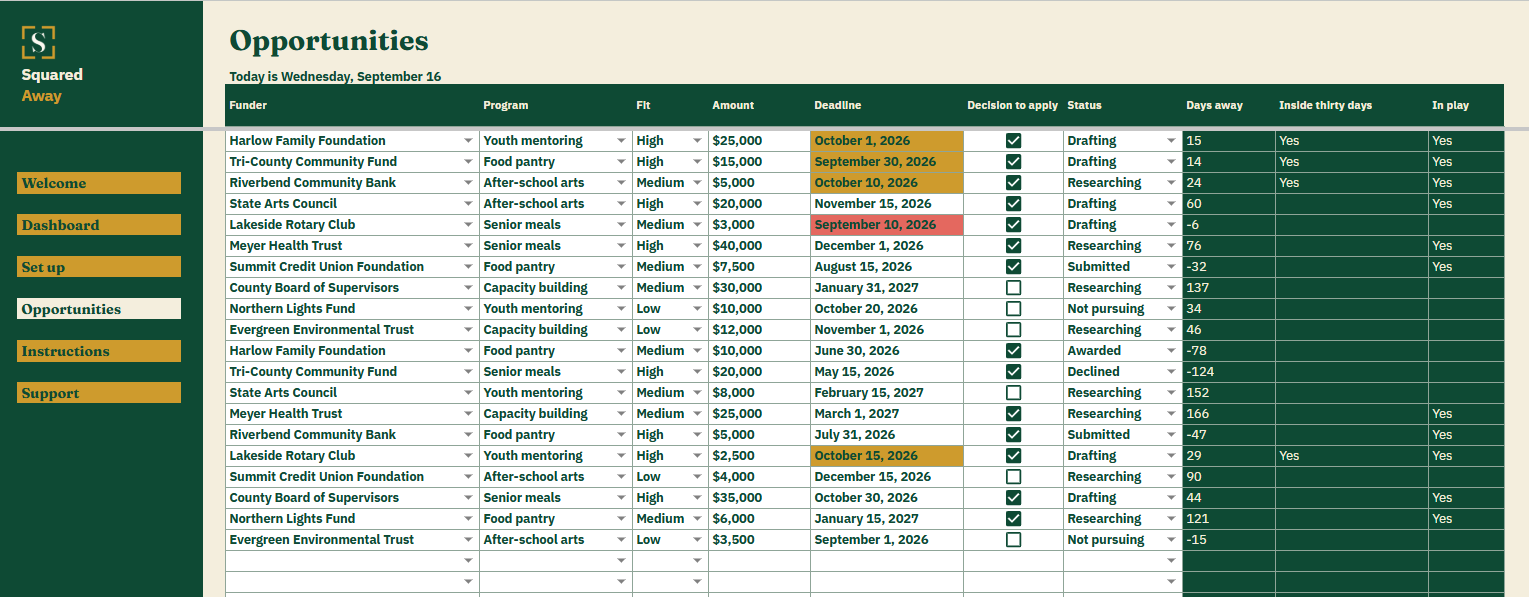
Type each opportunity once: the funder, the program, how good the fit is, what it could be worth, the deadline and whether you are going for it. The file counts down to every deadline, adds up what you are still pursuing and marks anything closing inside thirty days.
It finds nothing for you. The research is yours, and this is where it stops being lost.
Opportunities. One row each, with the funder, the program, the fit, the amount, the deadline and the status.
The decision. A tick for the ones you are going for, so a funder you ruled out stays ruled out instead of coming round again.
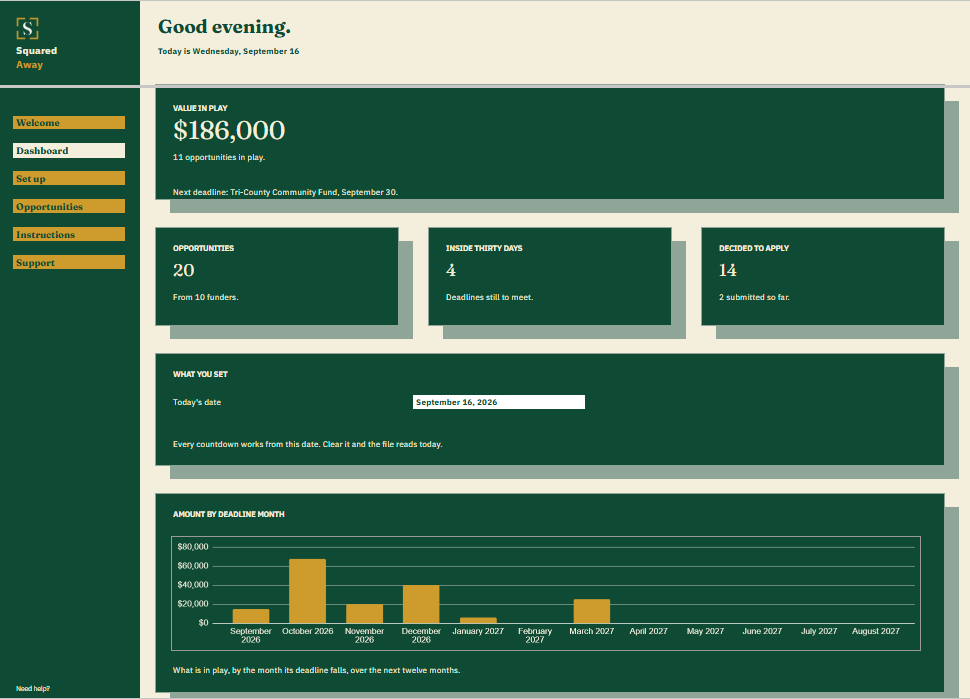
Value in play. What the ones you are still pursuing add up to, rather than everything anybody ever listed.
The Dashboard. The next deadline and whose it is, how many opportunities from how many funders, how many close inside thirty days and how many you have committed to.
The chart. What is in play by the month its deadline falls in, so a crowded month shows up early.
Red and gold. A deadline already gone turns red. One inside thirty days turns gold.
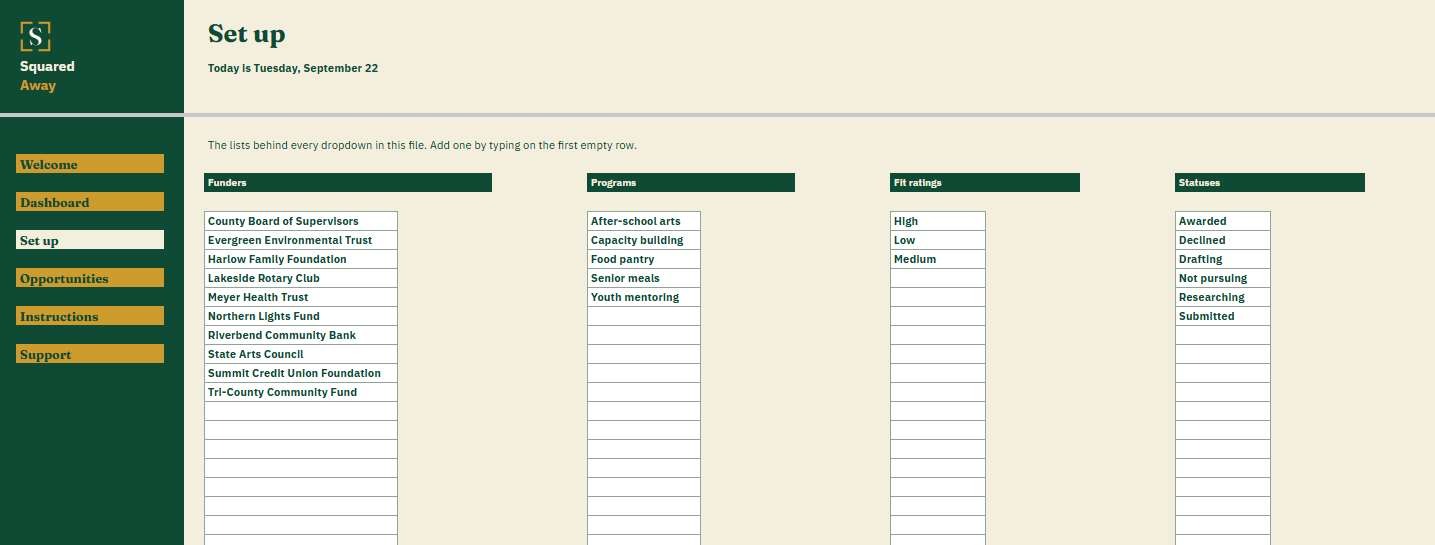
Set up. Your own funders, programs, fit ratings and statuses, behind the dropdowns on Opportunities.
Sample opportunities. Twenty made-up ones across ten funders, so the totals make sense before you type your own.
What it looks like
Three tabs you'll actually use.
After you buy
What happens after you buy.
1
We email you a link.
It goes to the address you paid with.
2
You make a copy.
It saves to your own Google Drive™ and stays private unless you share it.
3
You start using it.
It comes with sample entries already in it, so you can see how it works before you type in your own.
No surprises
The fine print, all of it.
You pay once, and the copy stays yours for good.
It opens in Google Sheets™ on a computer, or in the Sheets app on your phone.
You need a Google account. A free one works.
Changed your mind? Email us within 14 days for a refund. You don’t need a reason. The refund policy
Questions
Before you buy.
Does it find grants for me?
No. It is not a funder database and it does no research. It holds what you found, what you thought of it and when it closes.
What counts as in play?
The ones you ticked as going for, that have not been awarded or declined yet. That is the total on the Dashboard, so it does not flatter itself with money you already ruled out.
Can two of us work the same list?
Yes. It is one Google Sheets file, so share it the way your organization shares anything else.
S
Spend the week on the ones you can win.
No app to learn. No new account. No monthly anything.
$39one time
Tax added at checkout.
If it isn’t right, email us within 14 days for a refund. The refund policy
You just get squared away.
Cookie Consent
Some cookies keep the site working. The rest just count visits, and only if you say yes. If you say no, the site works exactly the same.
Cookies
Essential cookies stay on, because the site can't work without them. Everything else is your call.
Essential cookies enable basic functions and are necessary for the proper function of the website.
Name
Description
Duration
Cookie Preferences
This cookie is used to store the user's cookie consent preferences.