Equipment Loan and Rental Log · Borrowed machinery log for Google Sheets™
Know what is out, who has it, and what they owe.
Every machine that leaves the yard, who took it, when it is due back, what it rents for and the condition it went out in.
$39one time
Tax added at checkout.
The problem
The hay rake has been at the neighbor’s since the first.
Lending is the easy part. Three machines are out, two are past the date you agreed, and nobody wants to make the call because nobody is certain what the date was.
The ones you charge for are worse. Per day, per week, some weeks free, and at the end of the season the arithmetic is a guess you round down to keep the peace.
What's inside
What went out, when it is due, and how it came back.
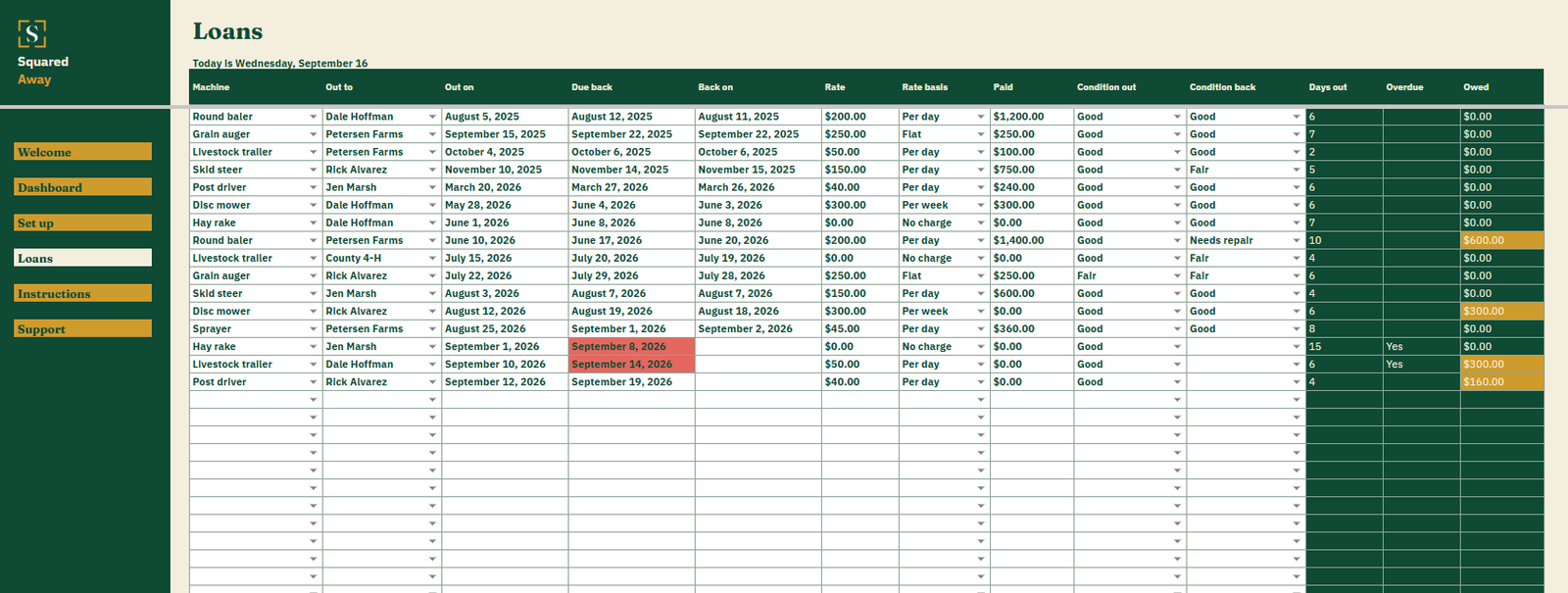
Type each loan once: the machine, who took it, the day it went, the day it is due and the condition it left in. The file counts the days out, marks anything past its date and works out what is owed from the rate and what has been paid.
It is not an agreement and there is nothing to sign. It is your own record of where your machinery is.
Loans. One row each, with the machine, who took it, out on, due back, back on, and the condition both ways.
Days out and overdue. Worked out from the dates, so overdue is a fact on a screen rather than a feeling.
What is owed. The rate against the days out, less whatever has been paid, for the loans you charge for.
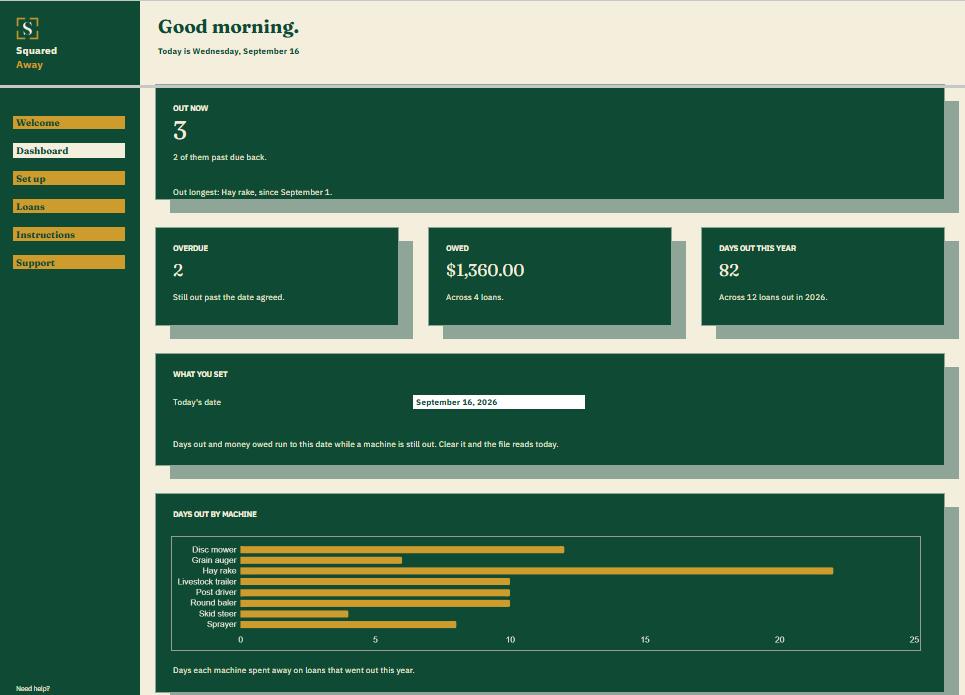
The Dashboard. How many machines are out and which has been gone longest, how many are overdue, what is owed, and the days your machinery spent away this year.
The chart. Days out by machine, so the one that is never in the yard is obvious.
Red and gold. A due date gone turns red. Money still owed turns gold.
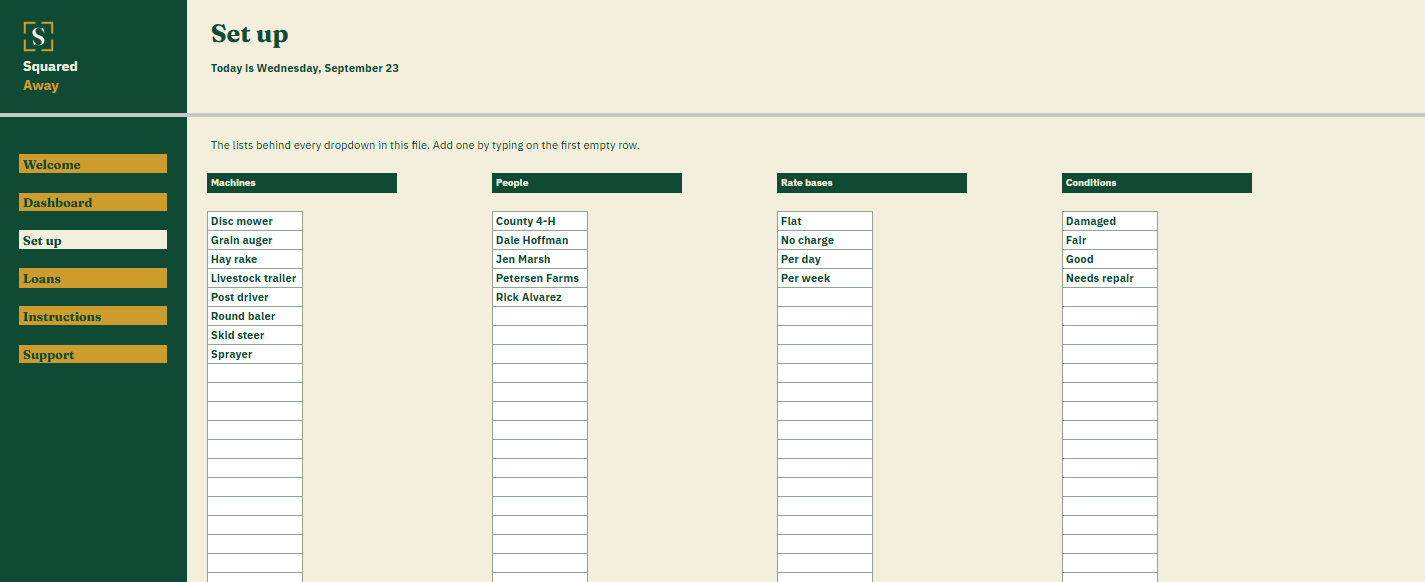
Set up. Your own machines, people, rate bases and conditions, behind the dropdowns on Loans.
Sample loans. Sixteen made-up ones across eight machines, so the figures make sense before you type your own.
What it looks like
Three tabs you'll actually use.
After you buy
What happens after you buy.
1
We email you a link.
It goes to the address you paid with.
2
You make a copy.
It saves to your own Google Drive™ and stays private unless you share it.
3
You start using it.
It comes with sample entries already in it, so you can see how it works before you type in your own.
No surprises
The fine print, all of it.
You pay once, and the copy stays yours for good.
It opens in Google Sheets™ on a computer, or in the Sheets app on your phone.
You need a Google account. A free one works.
Changed your mind? Email us within 14 days for a refund. You don’t need a reason. The refund policy
Questions
Before you buy.
Is this a rental agreement?
No. No agreements, nothing to sign. It is the record of what went out and what came back, which is what the conversation needs.
What if I lend it for nothing?
Set the rate basis to no charge. The days out still count, and the machine still shows as out, which is the part that gets forgotten.
Why record the condition twice?
Once when it leaves and once when it lands back. Two words in two cells, and a year later you know which loan the dent came from.
S
Ask for it back with the date in front of you.
No app to learn. No new account. No monthly anything.
$39one time
Tax added at checkout.
If it isn’t right, email us within 14 days for a refund. The refund policy
You just get squared away.
Cookie Consent
Some cookies keep the site working. The rest just count visits, and only if you say yes. If you say no, the site works exactly the same.
Cookies
Essential cookies stay on, because the site can't work without them. Everything else is your call.
Essential cookies enable basic functions and are necessary for the proper function of the website.
Name
Description
Duration
Cookie Preferences
This cookie is used to store the user's cookie consent preferences.