Insurance and Registration Register · Renewal records for Google Sheets™

Know what lapses next, long before it does.

Every policy, registration and permit your organization holds, with the next renewal counting down and what this year’s renewals cost.

$39 one time

Tax added at checkout.

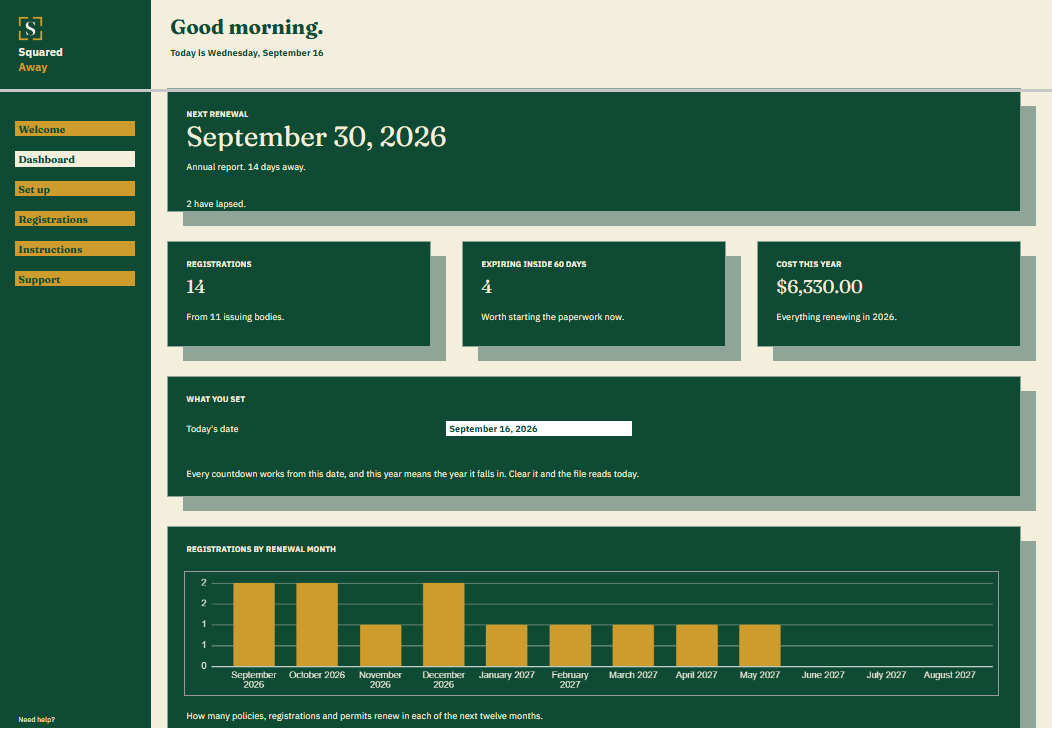
Insurance and Registration Register dashboard in Google Sheets showing the next renewal, 14 registrations, 4 expiring inside sixty days, $6,330.00 to renew this year, and a chart of renewals by month.
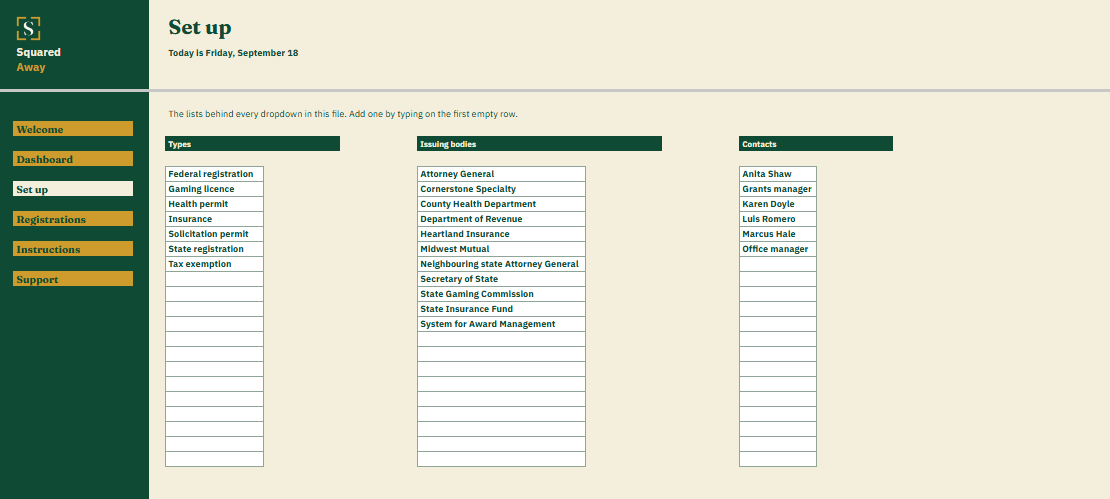
Insurance and Registration Register's Set up tab with the types, issuing bodies and contacts the organization fills in, which become the dropdowns on the Registrations tab.
The problem

Nothing tells you a registration has lapsed.

The annual report is due to the Secretary of State in September. The charitable solicitation registration renews in November, and the one for the neighboring state renewed in August, or it was meant to. The directors and officers policy sits in a broker’s email, the raffle license in a folder from last year’s gala, and the food service permit on the kitchen wall.

Each one has a date. They live in eight places, and the one that matters is always the one nobody was watching.

What's inside

One row for each, and the next renewal on the Dashboard.

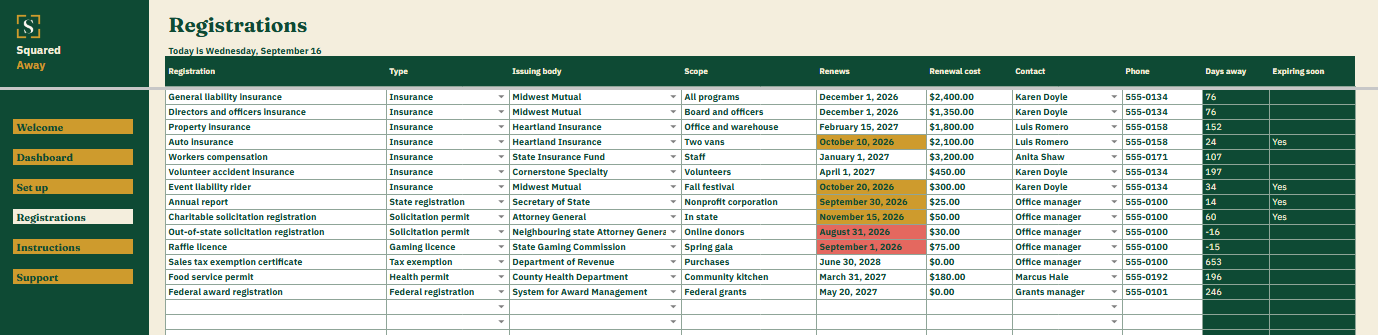
List everything you hold on Registrations: the type, who issues it, what it covers, when it renews, what renewing costs and who to call about it. The file counts the days to each one, marks what has lapsed and what renews inside sixty days, and totals what this year’s renewals come to.

It counts from the dates you type. When something renews you change the date, and the countdown starts again.

  • Registrations. Room for forty: the registration, its type, the issuing body, what it covers, the renewal date and cost, and who to call, with the days away worked out beside each.
  • The Dashboard. The next renewal and how far off, how many registrations you hold and from how many bodies, how many expire inside sixty days, and what this year costs to renew.
  • Renewals by month. A chart of the next twelve months, so a month carrying three of them is something you see coming rather than something you find out.
  • Red and gold. A lapsed date turns red. One inside sixty days turns gold.
  • Who to call. The contact and phone number sit on the same row as the date, because that is when you need them.
  • Set up. Your own types, issuing bodies and contacts, behind the dropdowns on Registrations.
  • Sample records. Fourteen made-up policies, registrations and permits already in place, so it makes sense before you type your own.
Insurance and Registration Register's Registrations tab listing 14 nonprofit insurance policies, state registrations and permits with the issuing body, scope, renewal date, cost and contact, and the countdown worked out beside each.
What it looks like

Three tabs you'll actually use.

Insurance and Registration Register dashboard in Google Sheets showing the next renewal, 14 registrations, 4 expiring inside sixty days, $6,330.00 to renew this year, and a chart of renewals by month.
Insurance and Registration Register's Registrations tab listing 14 nonprofit insurance policies, state registrations and permits with the issuing body, scope, renewal date, cost and contact, and the countdown worked out beside each.
Insurance and Registration Register's Set up tab with the types, issuing bodies and contacts the organization fills in, which become the dropdowns on the Registrations tab.
After you buy

What happens after you buy.

1

We email you a link.

It goes to the address you paid with.

2

You make a copy.

It saves to your own Google Drive™ and stays private unless you share it.

3

You start using it.

It comes with sample entries already in it, so you can see how it works before you type in your own.

No surprises

The fine print, all of it.

  • You pay once, and the copy stays yours for good.
  • It opens in Google Sheets™ on a computer, or in the Sheets app on your phone.
  • You need a Google account. A free one works.
  • Changed your mind? Email us within 14 days for a refund. You don’t need a reason. The refund policy
Questions

Before you buy.

Does it hold policy or registration numbers?

No, and it should not. The name of the policy and the body that issued it are enough to find the paperwork where it already lives.

Does it send reminders?

No. It shows what is next whenever you open it, with the soonest date at the top of the Dashboard.

What does cost this year mean?

Everything renewing in the calendar year, lapsed ones included. A lapsed registration still has to be paid to put right.

Can the treasurer see it too?

Yes. It is a Google Sheet, so you share your copy with whoever needs it, the way you share any other file.

How many can it hold?

Forty policies, registrations and permits.

Is there anything to renew?

No. You buy it once and the copy is yours to keep.

S

The board asks what is current. You already know.

No app to learn. No new account. No monthly anything.

$39 one time

Tax added at checkout.

If it isn’t right, email us within 14 days for a refund. The refund policy

You just get squared away.