Paycheck Planner · Paycheck-by-paycheck bill planner for Google Sheets™

Put every bill on the paycheck that pays it.

A Google Sheet for anyone paid hourly, weekly or on no fixed pattern. Type what you expect each pay date to bring, put your bills on it, and see what is left over.

$19 one time

Tax added at checkout.

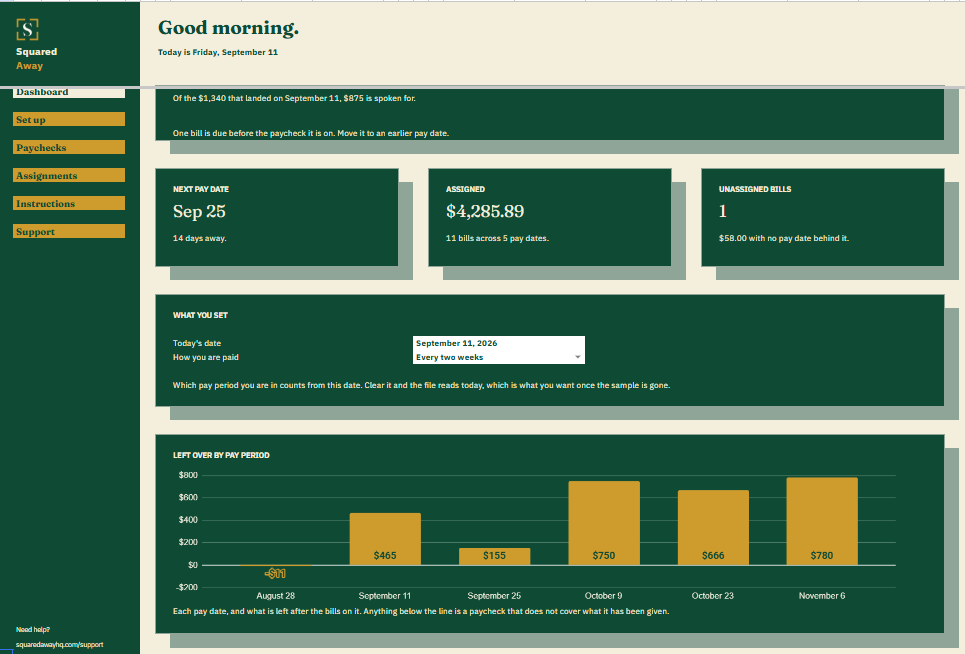
Paycheck Planner dashboard in Google Sheets showing $465.01 left over on the current paycheck, the next pay date, $4,285.89 of bills assigned, one bill with no pay date, and a chart of what each pay period has left.
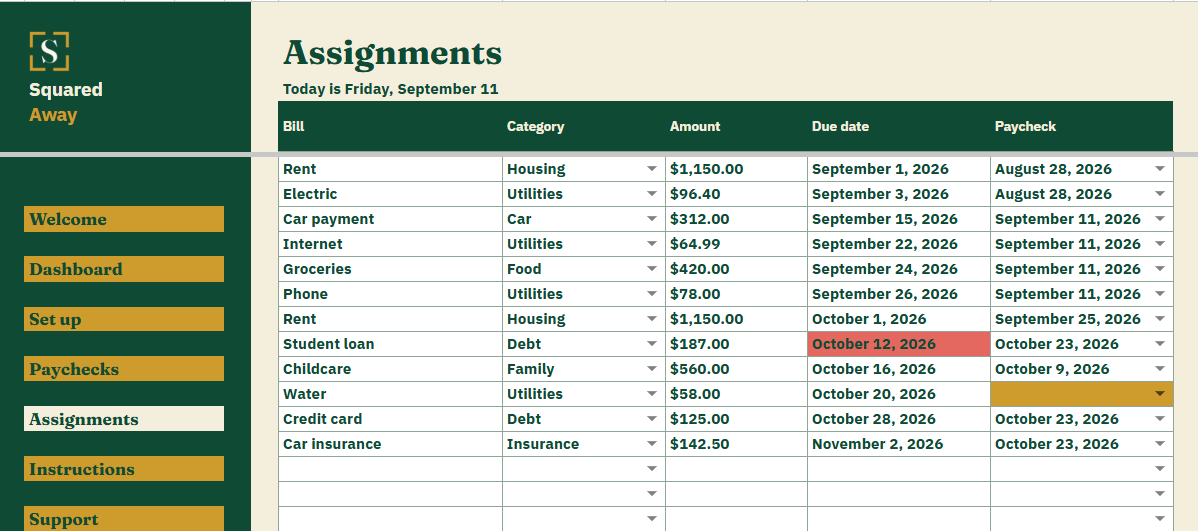
Paycheck Planner's Assignments tab listing 12 bills with the amount, the due date and the paycheck each one is paid from, one of them still without a pay date.
The problem

A monthly budget is no help when the money arrives weekly.

Rent is due on the first. You are paid on the 28th, and again on the 11th. One of those two has to carry the rent and the other has to carry everything else, and a monthly total will not tell you which.

It gets harder when the hours move. A short week is the one the car insurance happens to land on, and you find that out when the payment bounces.

What's inside

Every bill sits on a paycheck, and every paycheck shows what is left.

List your pay dates on Paychecks, with what you expect to land in the account. On Assignments, list each bill and pick the paycheck that pays it. The file totals what sits on each pay date and shows what is left over, or how far short that paycheck falls.

It does not work out your tax. You type what actually lands, because that is the only figure you can plan against.

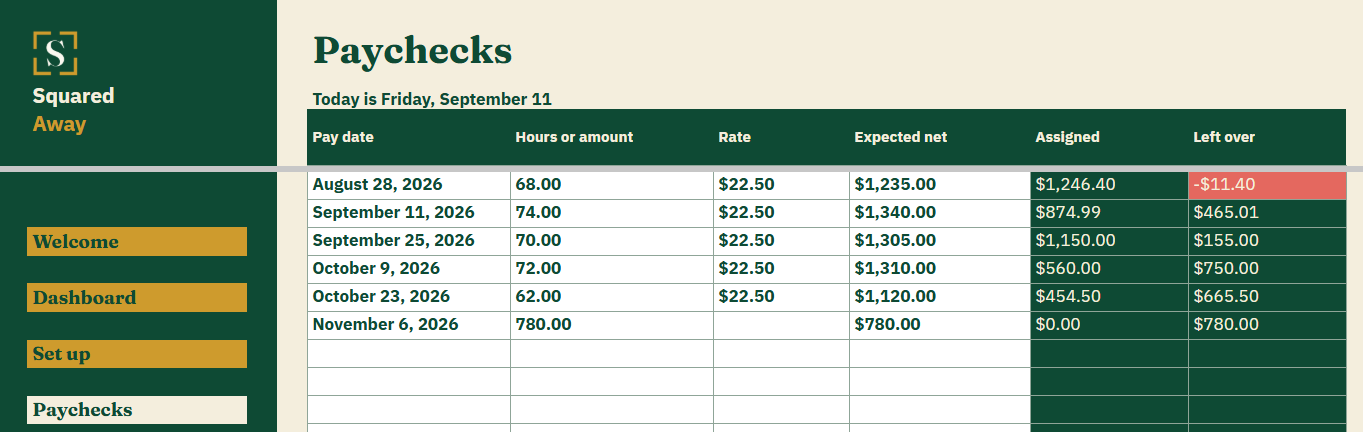
  • Paychecks. One row for each pay date: the hours and rate behind it if you want them, what you expect to land, and what is left after the bills on it.
  • Assignments. Every bill with its category, what it costs, when it is due, and the paycheck that pays it.
  • The Dashboard. What this pay period has left, when the next pay date is, how much is spoken for and how many bills have no paycheck yet, with a chart of every pay period.
  • Red and gold. A paycheck that will not cover its bills turns red, and so does a bill due before the paycheck it sits on. A bill nobody has assigned yet turns gold.
  • Set up. Your own bill categories, behind the dropdown on Assignments.
  • Sample data. Six made-up pay dates and twelve bills already in place, so the numbers make sense before you type your own.
Paycheck Planner's Paychecks tab listing 6 pay dates with the hours and rate behind each one, what is expected to land, what has been assigned to it, and what is left over.
What it looks like

Three tabs you'll actually use.

Paycheck Planner dashboard in Google Sheets showing $465.01 left over on the current paycheck, the next pay date, $4,285.89 of bills assigned, one bill with no pay date, and a chart of what each pay period has left.
Paycheck Planner's Paychecks tab listing 6 pay dates with the hours and rate behind each one, what is expected to land, what has been assigned to it, and what is left over.
Paycheck Planner's Assignments tab listing 12 bills with the amount, the due date and the paycheck each one is paid from, one of them still without a pay date.
After you buy

What happens after you buy.

1

We email you a link.

It goes to the address you paid with.

2

You make a copy.

It saves to your own Google Drive™ and stays private unless you share it.

3

You start using it.

It comes with sample entries already in it, so you can see how it works before you type in your own.

No surprises

The fine print, all of it.

  • You pay once, and the copy stays yours for good.
  • It opens in Google Sheets™ on a computer, or in the Sheets app on your phone.
  • You need a Google account. A free one works.
  • Changed your mind? Email us within 14 days for a refund. You don’t need a reason. The refund policy
Questions

Before you buy.

Does it connect to my bank?

No. Nothing here connects to anything. The file only holds what you put in it.

Does it work out my tax?

No. You type what you expect to land in the account after tax. Hours and your rate are there to record, so you can see why one paycheck is bigger than another.

My hours change every week. Does that matter?

No. That is what it is built for. Every pay date is its own row, so no two have to be the same.

What if I am paid twice a month rather than every two weeks?

You type the pay dates yourself, so any pattern works. Weekly, fortnightly, twice a month, or whenever the work comes in.

Can I use it on my phone?

Yes. Typing is easier on a laptop, but checking what a paycheck has to cover works anywhere.

Is there anything to renew?

No. You buy it once and the copy is yours to keep.

S

Payday stops being a guess.

No app. No account. No monthly anything.

$19 one time

Tax added at checkout.

If it isn’t right, email us within 14 days for a refund. The refund policy

You just get squared away.