Water Source and Well Log · Well and water test log for Google Sheets™
Know which well is due for a test, and who drilled it.
Every well, tank, pond and hydrant on the place, with the depth, the output, when it was last tested and who to call when it quits.
$39one time
Tax added at checkout.
The problem
The number for the pump outfit is on a card in the shop, somewhere.
Eight sources across the place, and what you know about each one is split between a folder, a truck console and whoever was standing there when it was drilled. The depth of the north pasture well is a number three people remember differently.
The tests are worse. They run on a schedule nobody wrote down, so one is two months overdue and another got done twice.
What's inside
Last tested, plus how often, gives the next test.
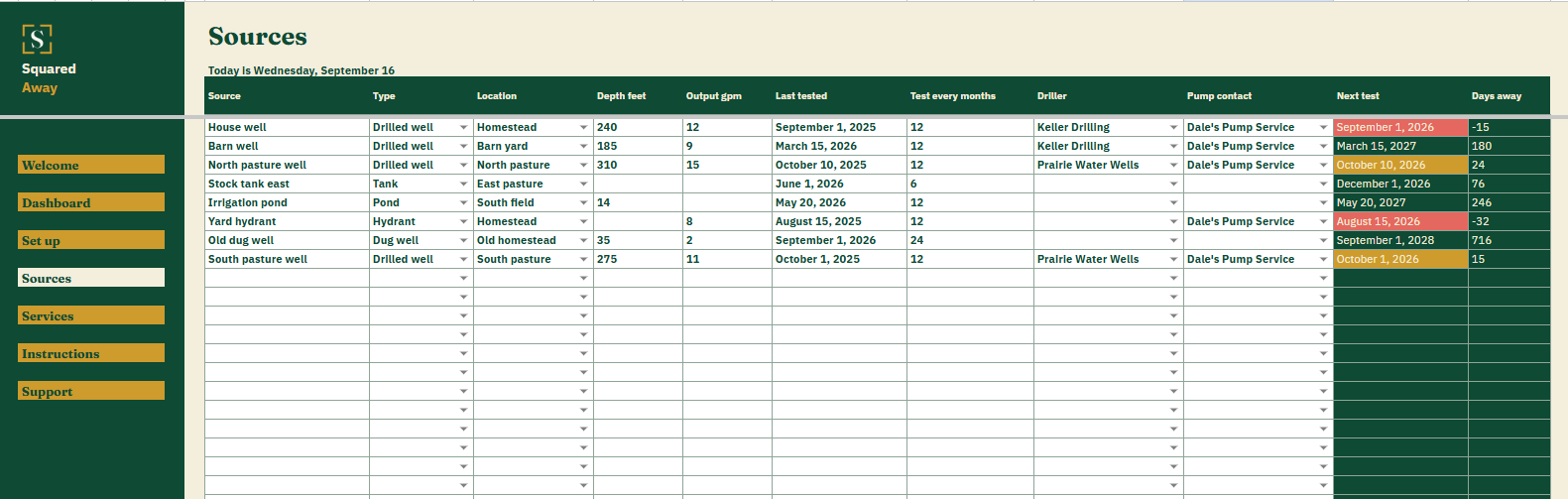
Type each source once: what it is, where it sits, how deep it goes, what it makes, when it was last tested and how many months between tests. The file works out the next date, counts the days to it and marks the ones that have gone by.
It offers nothing about what is in the water. You enter the date and what came back. Reading it is between you and the lab.
Sources. One row for every well, tank, pond and hydrant, with the type, the location, the depth and the output.
Next test, worked out. The last test date plus the months between them, with the days counted from today.
Who to call. The driller and the pump contact on the same row as the well, so the number is where the trouble is.
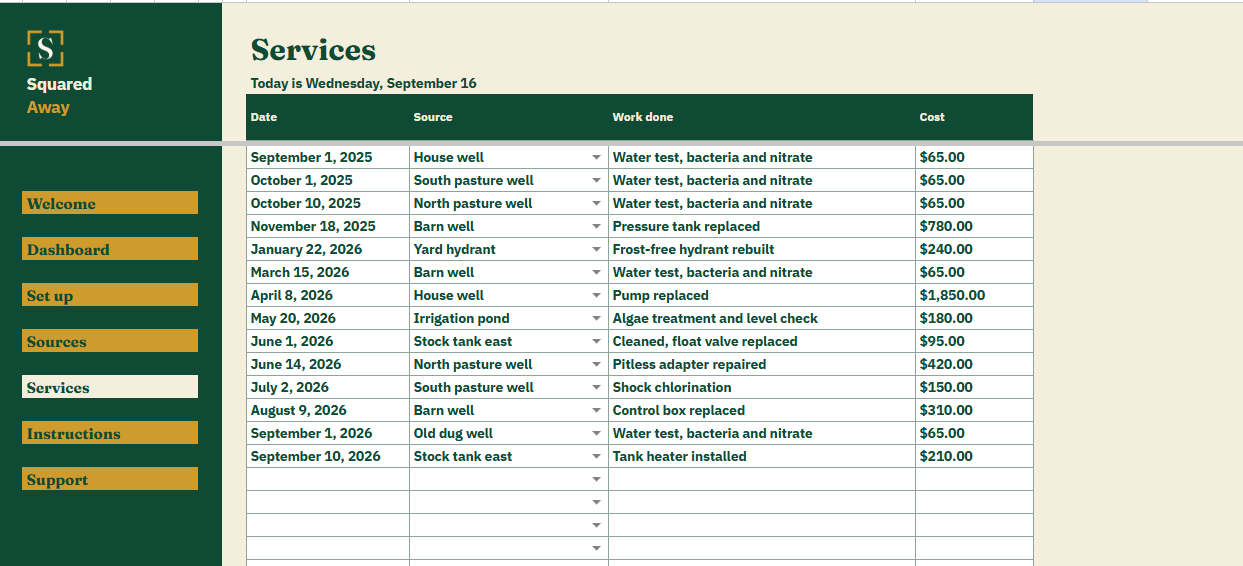
Services. Every dated job against a source, the work that was done and what it cost.
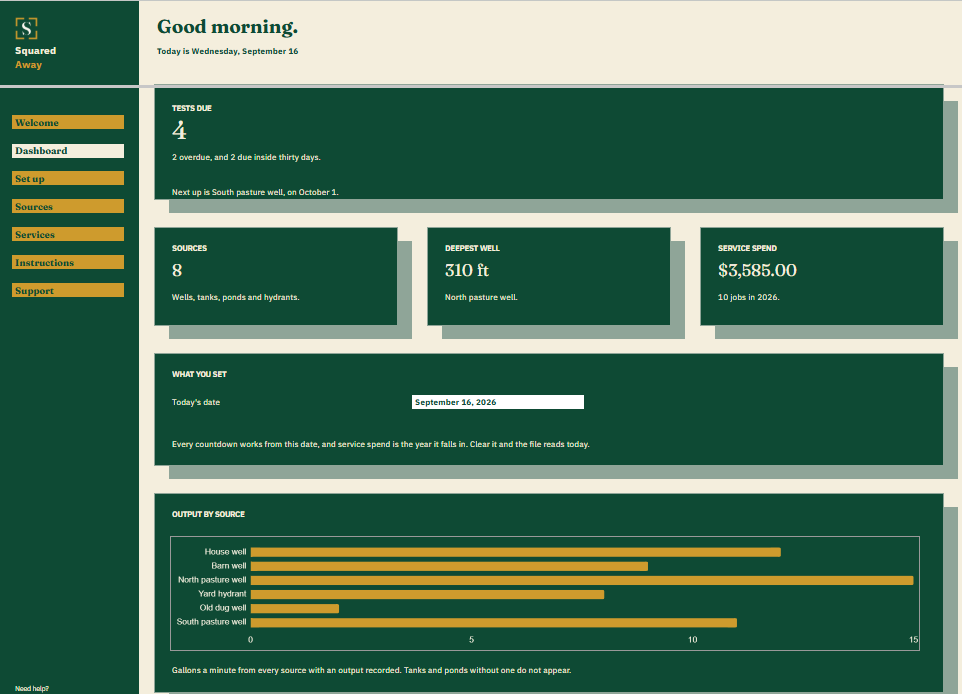
The Dashboard. How many tests are due and which comes next, how many sources you have, the deepest well, and what service has cost this year.
The chart. Gallons a minute by source, so a well falling off shows up against the others.
Red and gold. A test date already passed turns red. One inside thirty days turns gold.
Set up. Your own source types, locations and contacts, behind the dropdowns on both tabs.
Sample sources. Eight made-up ones and fourteen jobs, so the figures make sense before you type your own.
What it looks like
Three tabs you'll actually use.
After you buy
What happens after you buy.
1
We email you a link.
It goes to the address you paid with.
2
You make a copy.
It saves to your own Google Drive™ and stays private unless you share it.
3
You start using it.
It comes with sample entries already in it, so you can see how it works before you type in your own.
No surprises
The fine print, all of it.
You pay once, and the copy stays yours for good.
It opens in Google Sheets™ on a computer, or in the Sheets app on your phone.
You need a Google account. A free one works.
Changed your mind? Email us within 14 days for a refund. You don’t need a reason. The refund policy
Questions
Before you buy.
Does it tell me whether my water is safe?
No. There is no advice in it and nothing is checked against a standard. You enter the date of the test and what it came back as, and the file counts the months to the next one.
What about a pond or a stock tank?
Same list. Leave the depth and the output blank when there is nothing to put there. A tank still gets a test schedule and its own service history.
Does the service log tie back to the source?
Yes. Each job picks its source from the list, so one well’s history is a filter away and the year’s spend lands on the Dashboard by itself.
S
Have the number before the pump quits.
No app to learn. No new account. No monthly anything.
$39one time
Tax added at checkout.
If it isn’t right, email us within 14 days for a refund. The refund policy
You just get squared away.
Cookie Consent
Some cookies keep the site working. The rest just count visits, and only if you say yes. If you say no, the site works exactly the same.
Cookies
Essential cookies stay on, because the site can't work without them. Everything else is your call.
Essential cookies enable basic functions and are necessary for the proper function of the website.
Name
Description
Duration
Cookie Preferences
This cookie is used to store the user's cookie consent preferences.